Logging in to Sofriq should take only a few seconds. Whether you use your email and password or Google sign-in, make sure your browser has cookies enabled so your login session is saved.
How do I log in to Sofriq?
Open the Sofriq login page, enter the email address associated with your account, and provide your password. Select Login to continue.
- Open the Sofriq login page.
- Enter your registered email address.
- Enter your password.
- Select Login.
- Select Show Password if you want to check what you have entered.
If the details are valid, Sofriq opens your dashboard. If you opened a protected page and were redirected to login, Sofriq may return you to that original page.
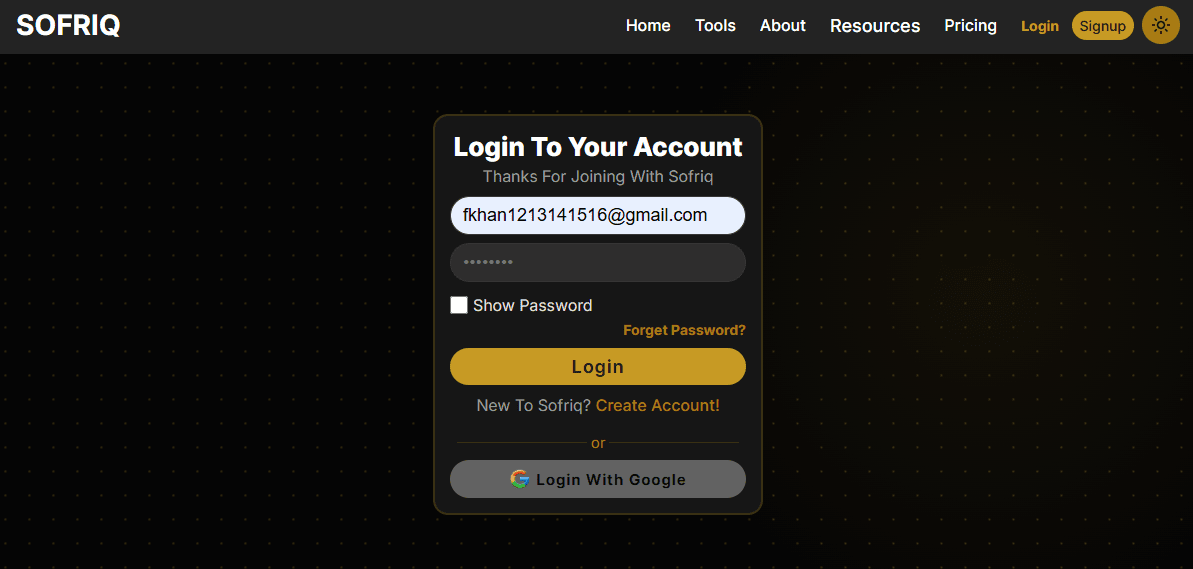
Can I log in with Google?
Yes. If you created or connected your account with Google, select Login With Google. Complete Google’s authorization prompt, then allow Sofriq to use the Google account associated with your profile. If account setup is incomplete, Sofriq may ask you to finish onboarding first.
Why did my Sofriq login fail?
- Confirm that the email address is spelled correctly.
- Check whether you created the account with this email address.
- Make sure Caps Lock is turned off.
- Use Show Password to verify the password.
- Select Forget Password? if you cannot remember it.
- Try Google sign-in if you created the account with Google.
How do I reset my Sofriq password?
- Select Forget Password? on the login page.
- Enter the email associated with your account.
- Select Send OTP.
- Check your email for the 6-digit code.
- Enter the OTP and select Verify.
- Enter and confirm your new password.
- Select Reset Password.
The new password must contain at least 8 characters. After resetting, Sofriq returns you to the login screen.
What should I do if the OTP email does not arrive?
- Check your spam or junk folder.
- Confirm that you entered the correct account email.
- Wait for the resend cooldown.
- Select Resend OTP after the cooldown finishes.
The OTP expires after 5 minutes. Request another code if it has expired.
Why does Sofriq say my OTP is invalid?
- Enter all 6 digits exactly as received.
- Use the most recently requested OTP.
- Confirm the email address used for the request.
- Request another OTP if the existing code has expired.
What can cause a password reset error?
A password reset stops if either password field is empty, the password is shorter than 8 characters, or the confirmation password does not match. Correct both fields before retrying.
How can I keep my Sofriq account secure?
- Use a unique password.
- Do not share your password or OTP.
- Sign out on shared devices.
- Reset your password if unauthorized access is suspected.
Common FAQs
Which email should I use to log in?
Use the email address registered with your Sofriq account.
Can I log in with Google?
Yes. Select "Log in with Google" and complete Google’s authorization.
Where am I redirected after login?
Usually to the dashboard. A protected page requested before login may open afterward.
What is the minimum password length?
The new password must contain at least 8 characters.