5 Common Pinterest Scheduling Mistakes (And How to Avoid Them)
Scheduling tools solve the biggest problem in Pinterest marketing — staying consistent without logging in every day. But handing off the daily posting doesn't mean you can hand off your judgment along with it. A few avoidable mistakes show up constantly once people start batch-scheduling, and they quietly undo a lot of the benefit the tool was supposed to give in the first place. None of them are complicated to fix — they're just easy to miss when you're moving quickly through a bulk upload.
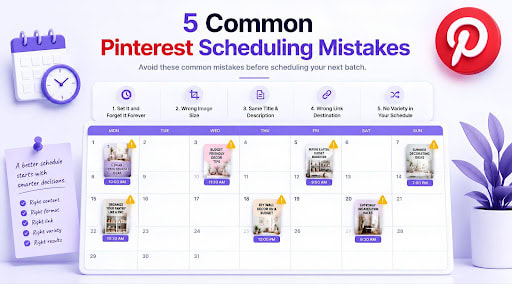
Here are the five that come up most often, and what to do instead.
Mistake 1: "Set It and Forget It" Forever
Batch-scheduling a month of pins in one sitting is genuinely a good habit — the mistake is treating that one sitting as the only time you ever think about the schedule again. Some accounts queue up three months of content and never look back, missing the chance to notice that one pillar is quietly outperforming the others, or that a particular pin format keeps getting more saves than the rest.
Instead: Keep the batching, but pair it with a short monthly check-in. Look at what performed well before building your next batch, and let that actually shape what you schedule next, rather than repeating the same mix on autopilot indefinitely. If "budget décor" pins are consistently outperforming "seasonal decorating," that's worth knowing before you build next month's batch, not something to notice by accident three months later.
Mistake 2: Uploading the Wrong Shape of Image
Pinterest is built around a vertical format — roughly a 2:3 ratio works best, similar to a 1000×1500 pixel image. Square images (built for Instagram) or wide landscape images (built for blog headers) get squeezed, cropped, or simply take up less visual space in the feed, which quietly hurts how often they get noticed at all.
This mistake is especially common with scheduling tools, because it's easy to upload a whole batch of images that were designed for something else entirely, without checking the shape of each one first.
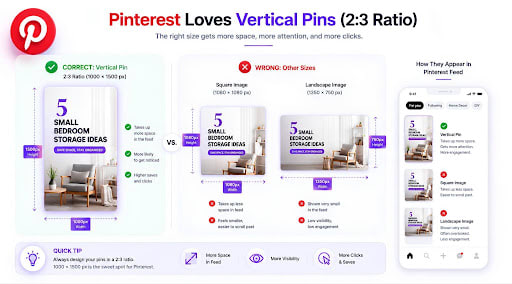
Instead: Design (or resize) images specifically for Pinterest's vertical format before they ever reach the upload stage. It's a small design habit that has an outsized effect on how much attention a pin actually gets.
Mistake 3: Copy-Pasting the Same Title and Description Everywhere
When you're moving through a bulk upload, it's tempting to write one solid title and description and reuse it — or a lightly tweaked version of it — across every pin in the batch. It saves time in the moment, but it quietly works against you: Pinterest's discovery is driven by search, and near-identical titles and descriptions across dozens of pins give the algorithm far less to work with when matching your content to what people are actually searching for.
Instead: Give each pin its own specific title and description, even if it takes a few extra minutes per pin. A title like "Small Bedroom Storage Ideas" and a description that actually describes what's behind the click will consistently out-discover a generic, reused one.
Mistake 4: Linking Every Pin to the Same Generic Page
It's common to link an entire batch of pins straight to a homepage or a general shop page, especially when scheduling in bulk and trying to move quickly. The problem is that a pin about "5 Small Bedroom Storage Ideas" that links to a generic homepage instead of the actual blog post or product about that exact topic creates friction the moment someone clicks — they land somewhere that doesn't match what the pin promised.
Instead: Take the extra few seconds per pin to link directly to the specific page that matches the pin's topic. It's a small step that has a direct effect on whether that click turns into anything more than a click.
Mistake 5: Loading an Entire Month Into One Undifferentiated Batch
This one is subtle. Batching content is good, but dumping a month's worth of pins into a schedule without any thought to variety — the same board over and over, the same content pillar three times in a row — creates a lopsided posting pattern even though it technically counts as "consistent."
Instead: Before uploading a batch, make sure it actually rotates through your different boards and content pillars in a sensible order, rather than just being whatever images happened to be sitting in a folder together. A few minutes of planning the order pays off in a feed that looks intentional rather than repetitive.
The Pattern Behind All Five
Every mistake on this list comes from the same root cause: treating scheduling as something you set up once and stop thinking about, rather than a workflow you still guide. The tool handles the repetitive, time-consuming part — the actual publishing — but the judgment calls around image format, wording, links, and variety still benefit from a few minutes of human attention before you hit confirm.
None of these fixes add real time to your workflow. Resizing images correctly, writing a unique title, double-checking a link — each one takes seconds, not minutes. The cost isn't the fix itself; it's remembering to do it in the rush of uploading a whole month's worth of content at once. Building a quick mental checklist — right shape, unique title, correct link, sensible order — before confirming any batch is usually enough to catch all five mistakes before they go live.
Get those small decisions right once per batch, and a Pinterest scheduler genuinely does what it's supposed to do: keep you consistent without becoming a source of new problems. Our scheduling guides go deeper into building a batch that avoids all five of these from the start.
Ready to streamline your entire digital marketing workflow? Sofriq Publish is a professional all-in-one social media management system built for seamless batch scheduling. Move beyond manual uploads and manage all your social platforms in one place, complete with 1-click AI-generated post copy to keep your content fresh and consistent.
Join the Conversation
Share your perspective, ask thoughtful questions, or leave constructive feedback about this article.